 What is RAID and how does it work?
RAID stands for Redundant Array of Inexpensive Disks and is essentially consists of more than 2 or more single hard drives arranged and built in different configurations and types.
Different types of RAID
There are several types of RAID arrays and each configuration has distinct pros and cons. The type of RAID array also drastically affects the potential outcome of data recovery and the probability of file recovery success. Let’s talk about the different RAID types to better understand. These are the common RAID types: RAID 0, RAID 1, RAID 5 and RAID 10 (Combination of RAID 1 and RAID 0).
RAID 0
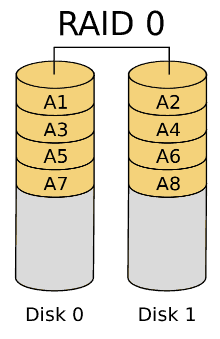
This is also known as a stripe set or striped volume. It’s tailored for those seeking high capacities and faster performance. Usually RAID 0 is not recommended for those seeking data security due to its lack of redundancy. As such, it not considered a ‘true’ RAID. It combines two hard drives preferably of identical size and speed to form a single logical volume. This makes it score highly on capacity because the resulting logical “hard drive” achieves twice the capacity. Once installed, data is written across both hard disks simultaneously, thereby doubling movement of data into the storage. In a RAID 0 configuration you are able to fully utilize the capacity of both hard drives. If you are using two 4TB drives, the system only sees one drive with 8TB of space. RAID 0 greatest undoing is that it cannot provide fault tolerance or redundancy. If one hard drive suffers failure or gets corrupted the overall data in its complete state is lost.
Recovery outlook
Failed RAID 0 arrays can be recovered at an individual drive level. Data may be incomplete or only possible in smaller segments or files. Data can only be recovered from the remaining live disk(s). In the event the data loss is due to a RAID controller failure or RAID configuration loss but not a disk failure then the chance of recovery is far better. Data Recovery Lab specialises in RAID0 data recovery and will be able to successfully recover data from a failed set of RAID0.
RAID 1
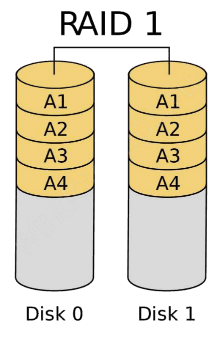
Also known as mirroring, this is the first ‘true’ level of RAID and it achieves redundancy and data security by continuously replicating or cloning data across two hard drives in a way that creates a complete backup down to the last bit of data. All data is simultaneously copied to each drive which means the likelihood of data loss is much less. The two drives are cloned, if one drive fails or deteriorates, the other has a complete replica of the data and it can be retrieved or even swapped into service immediately without moving the data. Adding more hard drives will not add more capacity only more redundancy. Unfortunately when it comes to capacity, you can only use half of the capacity available as the other drive is used for replication of data.
Recovery outlook
In the event of a single disk failure the chances are very good. The disk can usually be swapped back into service easily with minimal effort. Very small amounts of data loss could theoretically occur if data was not entirely written to all disks and a mechanical failure occurred however this is unlikely.
In the event of a multi-disk failure the recovery chances are reduced but may still remain good if the disks were not adjacent in the array. Failures due to other non disk related issues such as controller failure or configuration loss leave great recovery possibilities for RAID 1 arrays. Recovery Lab specialises in RAID 1 data recovery and will be able to successfully recover data from a failed set of RAID 1.
 RAID 5
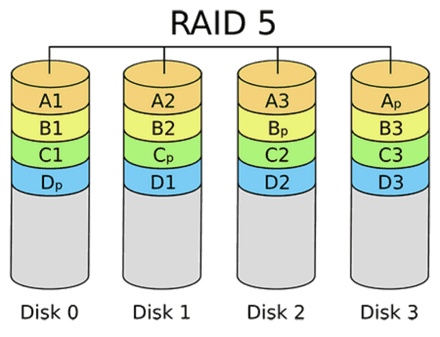
This is the most popular RAID type. It’s much more effective in achieving optimal capacity and redundancy. RAID 5 encompasses block level striping with distributed parity. It consists of a system of checksums called parity. If one drive fails subsequent reads can be calculated from the distributed parity in other drives and therefore no data is lost. RAID 5 requires at least 4 drives to achieve it’s ideal capacity and performance. A single hard drive collects the parity data. In the event that a drive fails, the RAID can be rebuilt and all data recovered. All you must do is add another hard drive to complete the array and begin restoration. The process may take quite some time but is considered a safer option in terms of redundancy and capacity.
Recovery outlook
If multiple disks have failed data recovery is still possible on the remaining live disks outside of the RAID array. It is also possible to replace the damaged drive and recover with the core RAID functionality. This type of RAID array can be recovered easily if the damage is not related to disk failure but rather controller failure, etc. Recovery Lab specialises in RAID 5 data recovery and will be able to successfully recover data from a failed set of RAID 5.
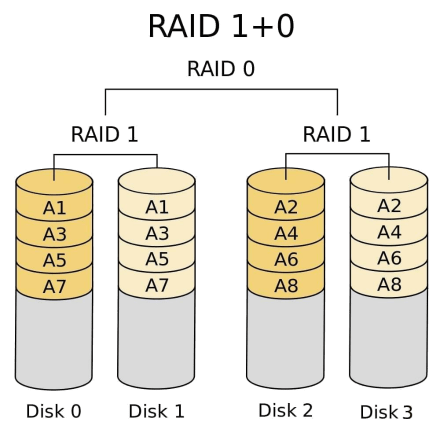 RAID 10
This type of RAID array combines the pros of both RAID 1 and RAID 0. Basically, it combines increased capacity and fault tolerance into a single solution. You achieve double the performance and capacity. It’s great when performance and space are concerns while maintaining a budget.
Recovery outlook
The recovery probability of a RAID 10 array (RAID 1+0 or RAID 0+1) is on-par with that of RAID 1 and RAID 0 arrays. Generally, recovery chances are quite good although the overall health of the remaining disks and the number of failed disks in the array plays a large role in the likelihood of successful file recovery. Recovery Lab specialises in RAID 10 data recovery and will be able to successfully recover data from a failed set of RAID 10.
Common causes of RAID failure
RAID systems are generally considered a reliable and safe option for managing and accessing data. However, occasionally they are susceptible to failure just as other hardware devices and this may lead to catastrophic loss of data. The consequences are much more severe if important files were not previously backed up. Remember that RAID is not an alternative for backup and even the most secure RAID array configurations can still fail. With this in mind, it’s imperative to continuously backup your data. RAID may fail due to several reasons, a few of which include:
- Failure of RAID controller
A RAID controller may fail due to a disastrous power surge that can knock out the NVRAM, corrupt your hard drive partitions or damage the boot memory rendering it impossible to boot or access your data.
- Failed rebuild of a hard drive
When a RAID drive is replaced, and RAID rebuild errors occur, this may hinder you from accessing your files or even the entire RAID array.
- Crashing of the server
The host machine of your RAID arrays may crash or fail leading to corruption of your RAID controllers and rendering your data inaccessible.
- Failure of multiple disks
Failure of a hard drive in an array may leave your array prone to future disk failure leading to system deterioration. Continued running of the array with degraded drives further increase the odds of suffering an even worse array failure.
Recovery Lab specialises in recovering data from different types of RAID arrays. Call our RAID data recovery experts on 0207 164 69 15 to discuss your case.

Leave A Comment